SCANPLANT NG MOBILITY
Mobile app for inventory management, order picking, and shipping
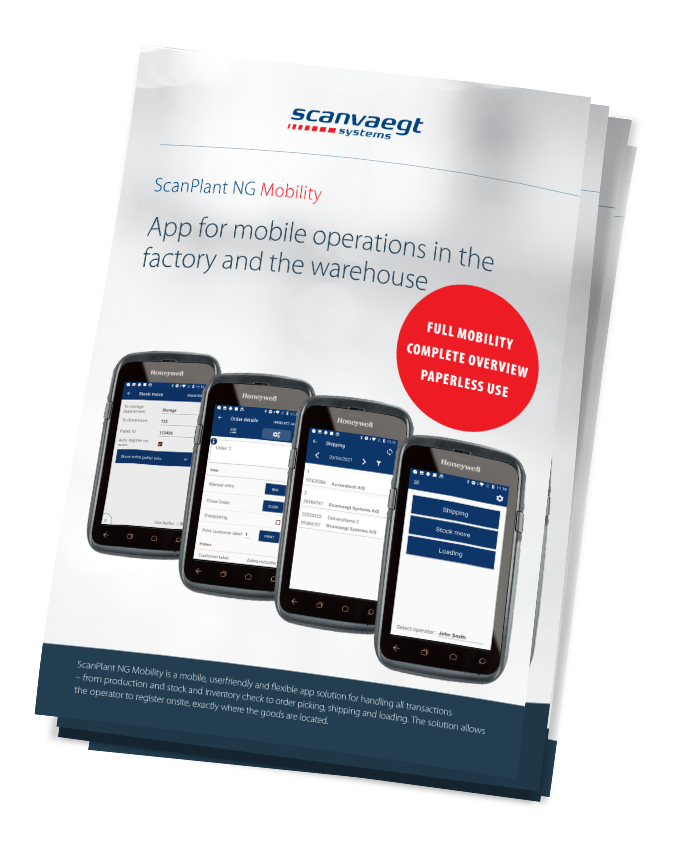
ScanPlant NG Mobility is an intelligent app solution for handling all transactions from inventory to order picking, loading, and shipping.
With this solution, the operator can register on-site where the goods are located – in the packing area or in storage.
The app includes features for inventory intake registration, inventory movement handling, stock level checking, as well as inventory management, shipping, and loading.
ScanPlant Mobility keeps track of all inventory while giving operators total mobility. The system offers full online integration and paperless functionality—ensuring real-time data registration, eliminating time-consuming paperwork, and providing transparency in all warehouse processes.
With ScanPlant Mobility, you get a single, powerful tool to manage tasks such as:
- Registration of inbound and outbound inventory
- Internal warehouse movements
- Stock control and inventory management
- Order picking and shipping
- Loading operations
Mobile and Flexible – Suitable for All Businesses
With handheld terminals, ScanPlant Mobility can be used on the go—no need to be tied to a computer or desk. These devices can scan items in the warehouse and help track all products moved to different locations. All movements can be recorded and stored in the cloud to prevent misplaced or lost items, making it easy for all authorized users to locate goods that have been relocated.
Key Features Include:
- Runs on Android, which—unlike Windows—is still actively supported and updated
- Allows end-to-end tracking of orders using only a handheld terminal
- Supports inventory sorting using various methods, including FIFO
- Provides full traceability when used alongside other ScanPlant production modules
Inventory Registration
When goods are ready from production and labeled with barcodes, operators can register them into inventory using ScanPlant Mobility by simply scanning the barcode. The products are then automatically listed in ScanPlant’s inventory reports.
Inventory Movements
The app also handles movements between locations—such as from main warehouse to production, or from production floor to specific racks. Movements can be registered even if the terminal is offline or out of Wi-Fi range.
Stock Checks and Inventory Control
Warehouses often consist of multiple departments and sublocations. ScanPlant Mobility makes it easy to perform regular stock checks and updates, with location-specific control. Discrepancies are automatically reported and stock levels are adjusted accordingly after scanning.
Order Picking and Shipping
ScanPlant Mobility supports picking items for sales orders. Operators see open orders on their handheld device as a digital picking list. Once an order is selected, the terminal is ready to scan item barcodes, which are then registered to the sales order and marked as ready for invoicing. The system ensures the correct items are picked for each order.
Picked items are then palletized and labeled with an SSCC label (A5 format), which is registered as part of the shipment.
Loading
Orders that have been packed and linked to a sales order can be scanned into a specific shipment. This gives the transport vehicle full documentation of what it is carrying. Multiple trucks can also be registered if an order is split across shipments. This feature is especially valuable for export customers who need full traceability of orders and deliveries.
Standard App
ScanPlant NG Mobility is a standard app for Android-based mobile computers (rugged for industrial use). In operation, these devices function much like regular smartphones. The app is also compatible with Honeywell Mobile Computers, tablets, and vehicle-mounted units.
Reduce Downtime
The intuitive and user-friendly interface reduces training time and lets operators focus on their tasks instead of figuring out how to perform certain functions. The paperless workflow also saves time—no need to print, handle, or file physical documents.
Online Integration
Handheld terminals communicate directly with the ScanPlant system over a Wi-Fi network. Some features even function when the terminal is offline.
Paperless Operation – Environmentally Friendly
With ScanPlant Mobility, your warehouse can operate completely paper-free. Operators can send order confirmations, delivery notes, and more with a single tap. If needed, the terminal can also print shipping labels. Packing lists can be viewed directly on the terminal, eliminating the need for printed copies.
Kontakt vores eksperter direkte

International Business Manager
Automatic weighing systems
+45 4053 4900
Error executing template "Designs/Swift-v2/eCom/ProductCatalog/partials/detail/section-related.cshtml"System.ArgumentException: The provided type 'Core.Indexing.CustomerProductIndexSchemaExtender, Core' is not compatible with the expected type 'Dynamicweb.Indexing.IIndexSchemaExtender'. (Parameter 'extenderType')at Dynamicweb.Indexing.Schemas.ExtensionFieldDefinition..ctor(String extenderType, IList`1 excludedFields)at Dynamicweb.Indexing.IndexHelper.GetField(List`1 fieldsFromExtenders, XElement fieldElement, String& fieldTypeName)at Dynamicweb.Indexing.IndexHelper.FillIndexWithSchema(XElement root, IIndex index)at Dynamicweb.Indexing.IndexHelper.ConvertToIndex(XElement obj, Boolean fillSchema)at Dynamicweb.Indexing.IndexService.LoadIndex(String name, Boolean fillSchema)at Dynamicweb.Indexing.Queries.IndexQueryProvider.Query(IQuery query, QuerySettings settings)at Dynamicweb.Indexing.Querying.QueryService.Query(IQuery query, QuerySettings settings)at Core.Services.QueryService.GetQueryResult(IQueryService queryService, String repository, String queryId, Dictionary`2 parameters, Int32 consumeSize)at Core.Services.QueryService.Query(String repositoryId, String queryId, Dictionary`2 parameters, Int32 consumeSize)at Core.Services.QueryService.GetIndexDocumentListFromQuery(String repository, String queryId, Dictionary`2 parameters, Int32 consumeSize)at Core.Extensions.ProductViewModelExtensions.GetSimilarProducts(ProductViewModel productViewModel, Int32 consumeSize)at CompiledRazorTemplates.Dynamic.RazorEngine_77955c71aab54c4a8d754aec6aa140c9.ExecuteAsync()at RazorEngine.Templating.TemplateBase.Run(ExecuteContext context, TextWriter reader)at RazorEngine.Templating.RazorEngineCore.RunTemplate(ICompiledTemplate template, TextWriter writer, Object model, DynamicViewBag viewBag)at RazorEngine.Templating.RazorEngineService.Run(ITemplateKey key, TextWriter writer, Type modelType, Object model, DynamicViewBag viewBag)at RazorEngine.Templating.DynamicWrapperService.Run(ITemplateKey key, TextWriter writer, Type modelType, Object model, DynamicViewBag viewBag)at RazorEngine.Templating.RazorEngineServiceExtensions.Run(IRazorEngineService service, String name, TextWriter writer, Type modelType, Object model, DynamicViewBag viewBag)at RazorEngine.Templating.RazorEngineServiceExtensions.<>c__DisplayClass23_0.<Run>b__0(TextWriter writer)at RazorEngine.Templating.RazorEngineServiceExtensions.WithWriter(Action`1 withWriter)at RazorEngine.Templating.RazorEngineServiceExtensions.Run(IRazorEngineService service, String name, Type modelType, Object model, DynamicViewBag viewBag)at Dynamicweb.Rendering.RazorTemplateRenderingProvider.Render(Template template)at Dynamicweb.Rendering.TemplateRenderingService.Render(Template template)at Dynamicweb.Rendering.Template.RenderRazorTemplate()1 @inherits ViewModelTemplate<Core.ViewModels.Ecommerce.ProductViewModel> 2 @using Core.Extensions 3 @using Dynamicweb.Rendering 4 @using Core.Services 5 @using Core.ViewModels.Base 6 @using Core.ViewModels.UI 7 @using Dynamicweb.Core.Encoders 8 @using Dynamicweb.Frontend 9 @using ButtonViewModel = Core.ViewModels.UI.ButtonViewModel 10 @using ProductListViewModel = Core.ViewModels.Ecommerce.ProductListViewModel; 11 12 @{ 13 ProductListViewModel similarProducts = Model.GetSimilarProducts(10); 14 bool hasSimilarProducts = similarProducts.CustomProducts.Any(); 15 bool hasRelatedCases = Model.RelatedCasePages.Any(); 16 bool hasCrossSellingProducts = Model.CrossSellingProducts.CustomProducts.Any(); 17 bool hasRelatedItems = hasRelatedCases || hasCrossSellingProducts || hasSimilarProducts; 18 } 19 20 @if (hasRelatedItems) 21 { 22 AddScript("https://cdn.jsdelivr.net/npm/swiper@11/swiper-element-bundle.min.js"); 23 AddStylesheet("https://cdn.jsdelivr.net/npm/swiper@11/swiper-bundle.min.css"); 24 <section class="core-section js-section py-6" id="core-section-productdetail-related-products" 25 data-dw-colorscheme="light"> 26 <div class="container-xl"> 27 28 <div class="row scanvaegt-paragraph-cases g-4 mb-6"> 29 @if (hasRelatedCases) 30 { 31 <h2 class="col-12">@Translate("Related Cases - Heading", "Relaterede cases")</h2> 32 33 @foreach (PageInfoViewModel relatedCasePage in Model.RelatedCasePages) 34 { 35 LinkViewModel link = new LinkViewModel {Url = SearchEngineFriendlyURLs.GetFriendlyUrl(relatedCasePage.ID)}; 36 ButtonViewModel btnViewModel = new ButtonViewModel 37 { 38 Text = Translate("Read more"), 39 Type = ButtonType.Link, 40 Link = link, 41 DisplayType = ButtonDisplayType.Link 42 }; 43 44 ColumnWidth columnClasses = new ColumnWidth() 45 { 46 Mobile = 12, 47 Desktop = 4 48 }; 49 50 ImageViewModel imageViewModel = relatedCasePage.Item.GetImage(); 51 imageViewModel.Alt = HtmlEncoder.HtmlAttributeEncode(relatedCasePage.Name ?? string.Empty); 52 imageViewModel.Ratio = ImageRatio.FourByThree; 53 imageViewModel.ImgTagClasses = new ClassList("h-100 w-100 object-fit-cover"); 54 imageViewModel.Sizes = ImageService.Instance.GetSizesByColumnWidths(columnClasses); 55 56 <div class="@columnClasses.ToClassList() scanvaegt-card h-100 has-link" 57 id="@relatedCasePage.ID"> 58 <a class="stretched-link" href="@btnViewModel.Link.Url"></a> 59 <div class="scanvaegt-card__image scanvaegt-image"> 60 @imageViewModel 61 </div> 62 <div class="scanvaegt-card__text scanvaegt-text pt-4" data-dw-colorscheme=""> 63 <h4>@relatedCasePage.Name</h4> 64 <p>@relatedCasePage.Item.GetString("Teaser")</p> 65 @btnViewModel 66 </div> 67 </div> 68 } 69 } 70 @if (hasCrossSellingProducts) 71 { 72 <h2>@Translate("Cross Selling - Heading", "Vi anbefaler også disse produkter")</h2> 73 @RenderingService.Instance.PartialView("eCom/ProductCatalog/Scanvaegt_ProductSlider.cshtml", Model.CrossSellingProducts) 74 } 75 76 @if (hasSimilarProducts) 77 { 78 <h2>@Translate("Similar Products - Heading", "Lignende produkter")</h2> 79 @RenderingService.Instance.PartialView("eCom/ProductCatalog/Scanvaegt_ProductSlider.cshtml", similarProducts) 80 } 81 </div> 82 </div> 83 84 </section> 85 } 86 87 @if (Model.IsWebshopProduct) 88 { 89 <div class="d-md-none"> 90 @RenderingService.Instance.PartialView("/eCom/ProductCatalog/partials/detail/need-help.cshtml", Model) 91 </div> 92 }
Få et uforpligtende tilbud
Send os en mail - vi kan hjælpe dig videre