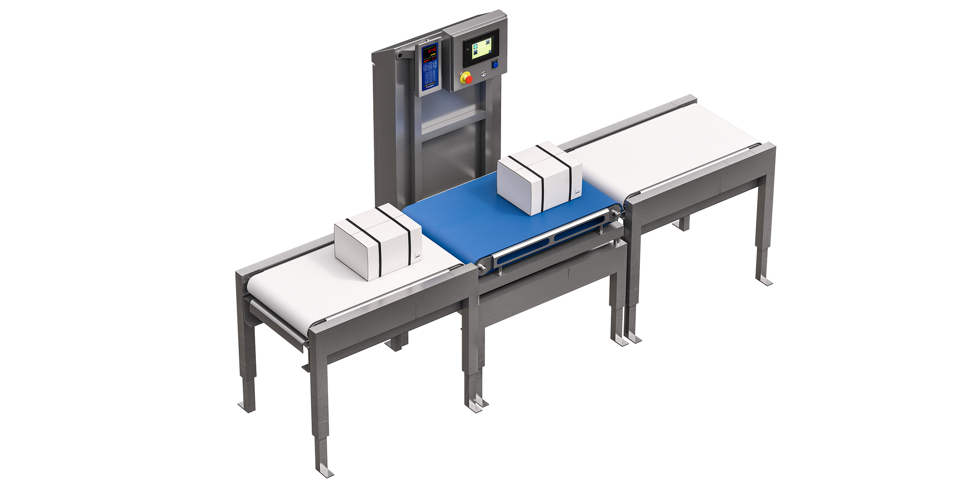
SCANVAEGT ABWL SYSTEM
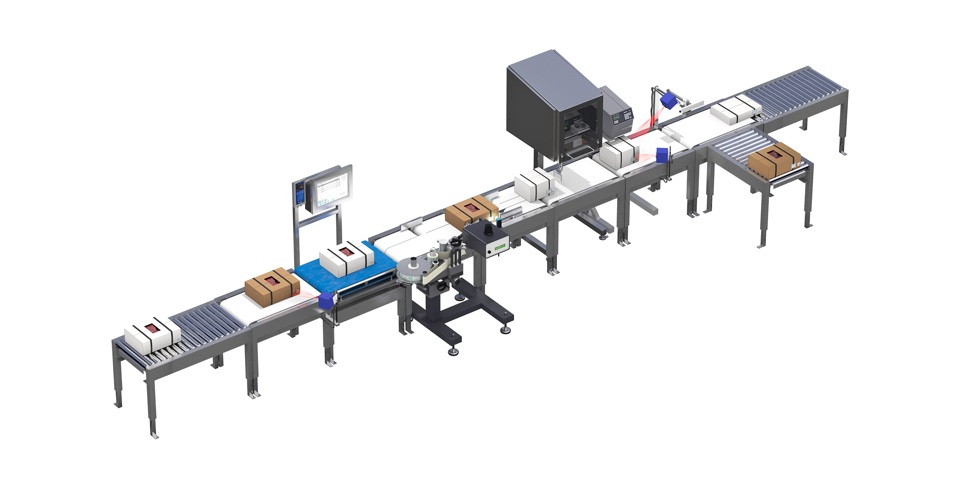
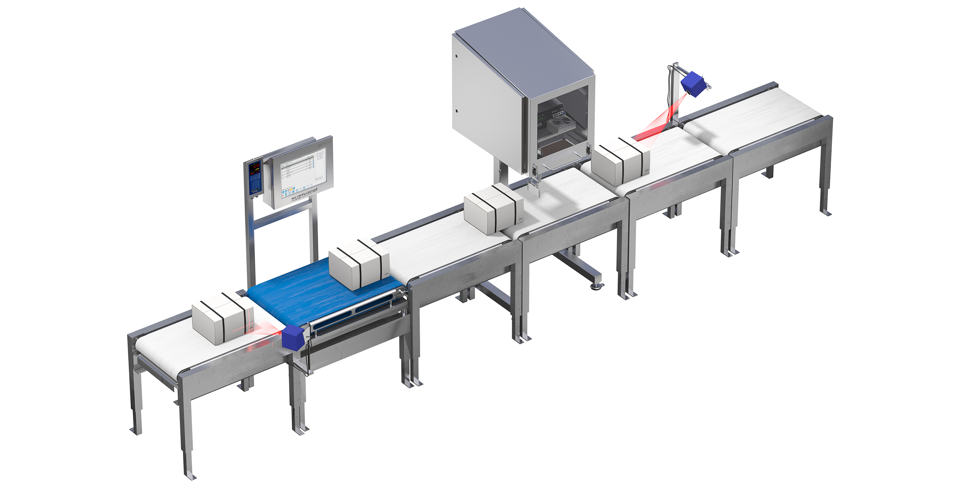
SCANVAEGT ABWL SYSTEM
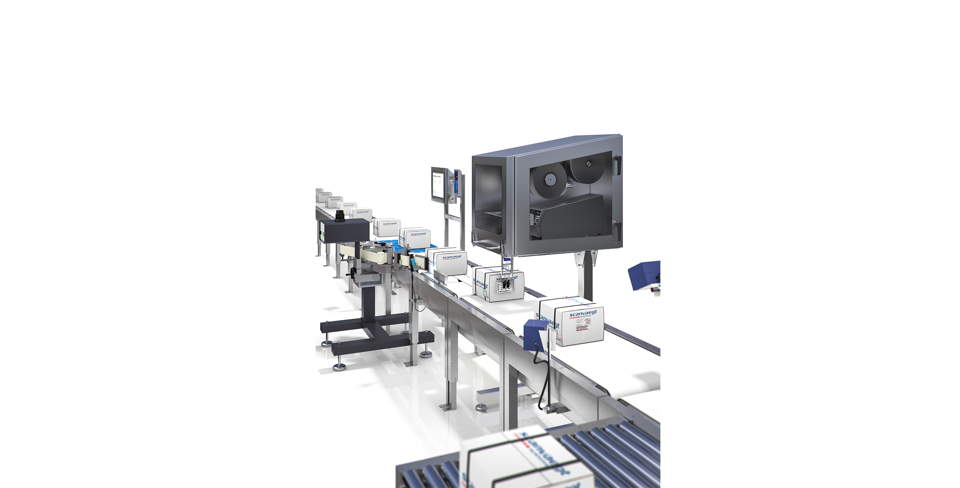
Automatic weighing, labeling, and control of weight and barcode

Scanvaegt ABWL System vejer og mærker kartonen og kontrollerer samtidig, at såvel vægt-indhold som oplysninger på etiketten er korrekte, at EF-etiketten er korrekt placeret og at stregkoden er læsbar.

  • Simultaneous control of both weight content and label information
  • Flexible design with multiple label placement options
  • Error elimination
  • High application speed

Ensuring Correctly Labeled Cartons with Correct Weight Content When cartons need to be packed, sealed, weighed, and labeled, there is a risk of errors. These errors can vary; the weight content might be incorrect, the barcode might be unreadable, the EU label might be placed incorrectly, or there may be discrepancies between the contents and the label.

Such errors can be avoided with the Scanvaegt ABWL System, which – in addition to weighing and labeling the carton – simultaneously ensures that both the weight content and the information on the label are correct, that the EU label is placed correctly, and that the barcode is clear and readable. If the carton deviates from the specifications, it is sorted out and sent to a fault lane for possible repacking.

Integrated Control Functions Eliminate Errors When the carton is strapped, the EU label is applied over the strap and subsequently checked by a color scanner. The ABWL system has a stop function that ensures only one carton is on the scale at a time, preventing incorrect weight measurements. Once the carton is weighed, the weighing terminal connects the weight with order information retrieved from the company’s own IT system.

The carton is then sent to the labeling function, where weight and order information are printed on the label, which is automatically applied to the side or end of the carton. The information to be printed and the label layout can be freely defined. A scanner then reads the barcode on the label and verifies that it is readable and matches the data generated in the weighing terminal when registering on the scale.

One System with Many Functions The new weighing and labeling station consists of:

  • Label applicator for applying the EU label
  • Color scanner to check proper application of the EU label
  • Belt scale for weighing the carton and weighing terminal for weight registration and communication with the IT system
  • Conveyor with centering unit to align the carton in position
  • Label printer in a steel cabinet and label applicator
  • Scanner for post-checking customer label and carton

Flexible Label Applicators The ABWL system’s label applicators, developed by Scanvaegt Systems, have a flexible design, offering several options for label placement on package units. The label can be placed on the side of the carton, on the front end or back end, on the top of the carton, or over the carton’s edge. The applicators can also label cartons of different sizes simultaneously.

The label applicators do not require much space between the cartons – this, combined with their high application speed, allows them to handle up to 20 cartons per minute for cartons with variable weight and up to 40 cartons per minute for cartons with fixed weight.

Kontakt vores eksperter direkte

Michael Nyborg
Michael Nyborg

International Business Manager

Automatic weighing systems

+45 4053 4900

Error executing template "Designs/Swift-v2/eCom/ProductCatalog/partials/detail/section-related.cshtml"System.ArgumentException: The provided type 'Core.Indexing.CustomerProductIndexSchemaExtender, Core' is not compatible with the expected type 'Dynamicweb.Indexing.IIndexSchemaExtender'. (Parameter 'extenderType')at Dynamicweb.Indexing.Schemas.ExtensionFieldDefinition..ctor(String extenderType, IList`1 excludedFields)at Dynamicweb.Indexing.IndexHelper.GetField(List`1 fieldsFromExtenders, XElement fieldElement, String& fieldTypeName)at Dynamicweb.Indexing.IndexHelper.FillIndexWithSchema(XElement root, IIndex index)at Dynamicweb.Indexing.IndexHelper.ConvertToIndex(XElement obj, Boolean fillSchema)at Dynamicweb.Indexing.IndexService.LoadIndex(String name, Boolean fillSchema)at Dynamicweb.Indexing.Queries.IndexQueryProvider.Query(IQuery query, QuerySettings settings)at Dynamicweb.Indexing.Querying.QueryService.Query(IQuery query, QuerySettings settings)at Core.Services.QueryService.GetQueryResult(IQueryService queryService, String repository, String queryId, Dictionary`2 parameters, Int32 consumeSize)at Core.Services.QueryService.Query(String repositoryId, String queryId, Dictionary`2 parameters, Int32 consumeSize)at Core.Services.QueryService.GetIndexDocumentListFromQuery(String repository, String queryId, Dictionary`2 parameters, Int32 consumeSize)at Core.Extensions.ProductViewModelExtensions.GetSimilarProducts(ProductViewModel productViewModel, Int32 consumeSize)at CompiledRazorTemplates.Dynamic.RazorEngine_77955c71aab54c4a8d754aec6aa140c9.ExecuteAsync()at RazorEngine.Templating.TemplateBase.Run(ExecuteContext context, TextWriter reader)at RazorEngine.Templating.RazorEngineCore.RunTemplate(ICompiledTemplate template, TextWriter writer, Object model, DynamicViewBag viewBag)at RazorEngine.Templating.RazorEngineService.Run(ITemplateKey key, TextWriter writer, Type modelType, Object model, DynamicViewBag viewBag)at RazorEngine.Templating.DynamicWrapperService.Run(ITemplateKey key, TextWriter writer, Type modelType, Object model, DynamicViewBag viewBag)at RazorEngine.Templating.RazorEngineServiceExtensions.Run(IRazorEngineService service, String name, TextWriter writer, Type modelType, Object model, DynamicViewBag viewBag)at RazorEngine.Templating.RazorEngineServiceExtensions.<>c__DisplayClass23_0.<Run>b__0(TextWriter writer)at RazorEngine.Templating.RazorEngineServiceExtensions.WithWriter(Action`1 withWriter)at RazorEngine.Templating.RazorEngineServiceExtensions.Run(IRazorEngineService service, String name, Type modelType, Object model, DynamicViewBag viewBag)at Dynamicweb.Rendering.RazorTemplateRenderingProvider.Render(Template template)at Dynamicweb.Rendering.TemplateRenderingService.Render(Template template)at Dynamicweb.Rendering.Template.RenderRazorTemplate()
1 @inherits ViewModelTemplate<Core.ViewModels.Ecommerce.ProductViewModel> 2 @using Core.Extensions 3 @using Dynamicweb.Rendering 4 @using Core.Services 5 @using Core.ViewModels.Base 6 @using Core.ViewModels.UI 7 @using Dynamicweb.Core.Encoders 8 @using Dynamicweb.Frontend 9 @using ButtonViewModel = Core.ViewModels.UI.ButtonViewModel 10 @using ProductListViewModel = Core.ViewModels.Ecommerce.ProductListViewModel; 11 12 @{ 13 ProductListViewModel similarProducts = Model.GetSimilarProducts(10); 14 bool hasSimilarProducts = similarProducts.CustomProducts.Any(); 15 bool hasRelatedCases = Model.RelatedCasePages.Any(); 16 bool hasCrossSellingProducts = Model.CrossSellingProducts.CustomProducts.Any(); 17 bool hasRelatedItems = hasRelatedCases || hasCrossSellingProducts || hasSimilarProducts; 18 } 19 20 @if (hasRelatedItems) 21 { 22 AddScript("https://cdn.jsdelivr.net/npm/swiper@11/swiper-element-bundle.min.js"); 23 AddStylesheet("https://cdn.jsdelivr.net/npm/swiper@11/swiper-bundle.min.css"); 24 <section class="core-section js-section py-6" id="core-section-productdetail-related-products" 25 data-dw-colorscheme="light"> 26 <div class="container-xl"> 27 28 <div class="row scanvaegt-paragraph-cases g-4 mb-6"> 29 @if (hasRelatedCases) 30 { 31 <h2 class="col-12">@Translate("Related Cases - Heading", "Relaterede cases")</h2> 32 33 @foreach (PageInfoViewModel relatedCasePage in Model.RelatedCasePages) 34 { 35 LinkViewModel link = new LinkViewModel {Url = SearchEngineFriendlyURLs.GetFriendlyUrl(relatedCasePage.ID)}; 36 ButtonViewModel btnViewModel = new ButtonViewModel 37 { 38 Text = Translate("Read more"), 39 Type = ButtonType.Link, 40 Link = link, 41 DisplayType = ButtonDisplayType.Link 42 }; 43 44 ColumnWidth columnClasses = new ColumnWidth() 45 { 46 Mobile = 12, 47 Desktop = 4 48 }; 49 50 ImageViewModel imageViewModel = relatedCasePage.Item.GetImage(); 51 imageViewModel.Alt = HtmlEncoder.HtmlAttributeEncode(relatedCasePage.Name ?? string.Empty); 52 imageViewModel.Ratio = ImageRatio.FourByThree; 53 imageViewModel.ImgTagClasses = new ClassList("h-100 w-100 object-fit-cover"); 54 imageViewModel.Sizes = ImageService.Instance.GetSizesByColumnWidths(columnClasses); 55 56 <div class="@columnClasses.ToClassList() scanvaegt-card h-100 has-link" 57 id="@relatedCasePage.ID"> 58 <a class="stretched-link" href="@btnViewModel.Link.Url"></a> 59 <div class="scanvaegt-card__image scanvaegt-image"> 60 @imageViewModel 61 </div> 62 <div class="scanvaegt-card__text scanvaegt-text pt-4" data-dw-colorscheme=""> 63 <h4>@relatedCasePage.Name</h4> 64 <p>@relatedCasePage.Item.GetString("Teaser")</p> 65 @btnViewModel 66 </div> 67 </div> 68 } 69 } 70 @if (hasCrossSellingProducts) 71 { 72 <h2>@Translate("Cross Selling - Heading", "Vi anbefaler også disse produkter")</h2> 73 @RenderingService.Instance.PartialView("eCom/ProductCatalog/Scanvaegt_ProductSlider.cshtml", Model.CrossSellingProducts) 74 } 75 76 @if (hasSimilarProducts) 77 { 78 <h2>@Translate("Similar Products - Heading", "Lignende produkter")</h2> 79 @RenderingService.Instance.PartialView("eCom/ProductCatalog/Scanvaegt_ProductSlider.cshtml", similarProducts) 80 } 81 </div> 82 </div> 83 84 </section> 85 } 86 87 @if (Model.IsWebshopProduct) 88 { 89 <div class="d-md-none"> 90 @RenderingService.Instance.PartialView("/eCom/ProductCatalog/partials/detail/need-help.cshtml", Model) 91 </div> 92 }

Få et uforpligtende tilbud

Send os en mail - vi kan hjælpe dig videre